
Admins
Admins can manage everything in the app. They have full access to all content, app settings, and user information. Admins log into the App Manager with their username and password. You can have as many admins as you need.
If your app has no admins set up, contact the UnionConnect team so we can assign admin access to the initial people who should control the app.
Content Managers
Content Managers can add and update content in the App Manager, but their access is limited. They cannot edit app settings, manage user accounts, or make administrative changes. Their role is strictly content-focused.
You can add as many Content Managers as you need, and they can start posting updates without having access to the sensitive parts of your app.
Change a User’s Role
- Login to the app manager
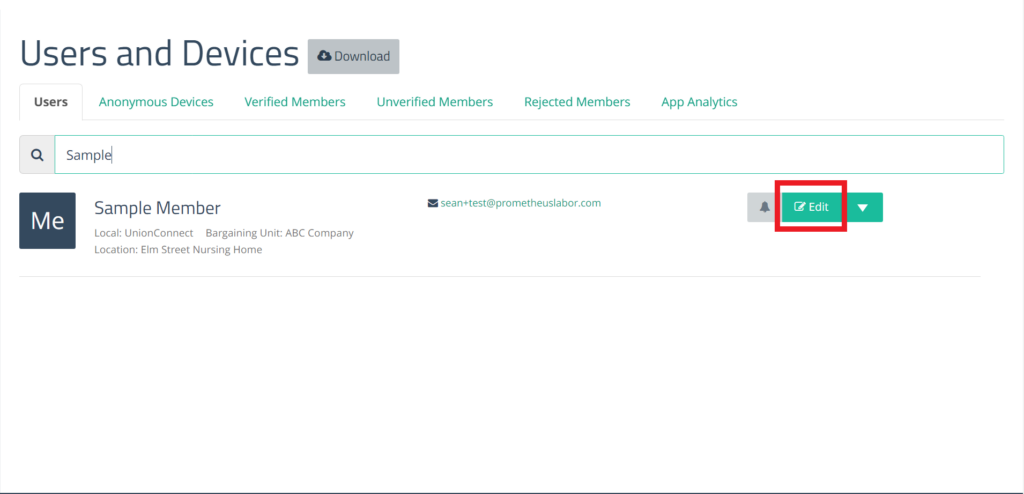
- From the menu on the left under Union Resources, click Users and Devices
- Search for the user you want to make an admin, and click Edit next to their name:
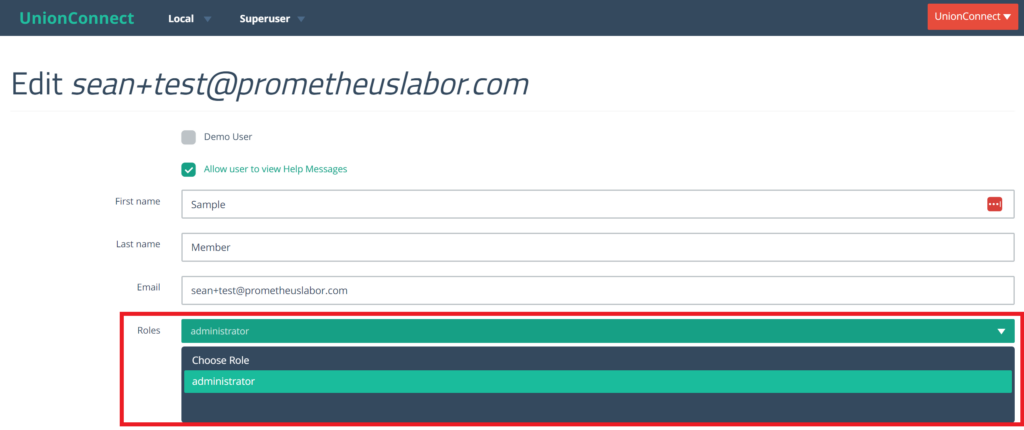
- Click the Choose Role dropdown and select the role you want the user to have:
- Scroll down and click Finish to save your changes